Guide on alerts and notifications
When scanning your device data in real-time, our platform can detect threshold exceeds and generate alerts to let you know your air quality deteriorates.
In the home page of your application, you will see numbers in a red badge on the Alert icon from time to time. It represents the number of alerts triggered by your data on the current day. The page can stay on background, and you are free to review them just when you think about it while keeping your attention elsewhere.
Some users will want to get explicitly notified when alert is triggered on a custom list of devices. This behaviour is available on mobile and desktop devices.
If you don't receive notifications or face errors, jump to Troubleshooting problems on notification activation
Alert types
There are two types of events that trigger alerts:
- Exceeding threshold repeatedly on one or multiple pollutants (we will discuss that subject).
- Losing network connection between the device and our servers (in our Cloud platform).
How do we define thresholds?
In your device most of the sensors measure the quantity of specific particulates and chemical elements present in the air. We then talk of concentration in the air. For gas, we often measure this concentration in part per million (ppm) or part per billion (ppb), that's the case for carbon dioxide (CO₂), methane (CH₄), etc. We use other units for particulate matter: µg/m³ or count per m³ depending on the configuration.
In order to determine warning thresholds, we refer to local health authorities and regulations in terms of occupational safety but also on WHO [1] recommendations.
For example, in France, the ANSES determines Occupational Exposure Limit values (OELs) of chemical substances for workers that are exposed to them for a certain amount of time. The referenced period can be 15 minutes long or 8 hours long.
Based on these standards we also implement a five-level scale from very good (poor concentration considered safe) to very bad (high concentration considered hazardous). This is done in accordance to methods derived from official Air Quality Index calculations.
A similar scale is applied to temperature, pressure, or humidity based on the French Work Code or other official sources for recommendations.
When configuring your device, we set the appropriate scales and limits for your application. We can also set custom thresholds values and scales if your business induces exceptions.
To be the most preventive possible, even one-time measures are showed on the OEL scale in the application (colours going from green to red)
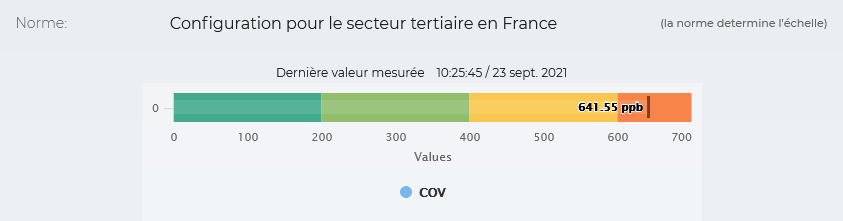
However, an isolated value could never be really considered dangerous, alerts are created by computing means on bigger range of time.
Alert creation algorithm
You cannot wait for 8 hours before being alerted if your employees are at risk at the workplace, thus our platform triggers alerts on an hourly basis to send you the air quality warnings quickly. From the previously explained scales, we deduct internally a meaningful "hourly" threshold for each pollutant and track all exceeding values.
We analyse the data flow of your device by computing roll means every 30 seconds on windows of 15 minutes. As a result, we get a whole hour of means (each point is a 15-minute mean) and we look for repeated exceeding in real-time all along this hour.
This is only at this specific condition that an alert will be triggered.
Troubleshooting problems on notification activation
Currently the feature remains unsupported on Apple devices. We're working hard to give to all our users all the services they need. We will bring you updates and let you know when it is fully supported.
Below are the supported browsers:
- Firefox
- Chrome
- Opera
- Brave
- Samsung Internet
If you don't find your browser in the list, do not expect a satisfying result. We hope we will be able to grow this list in the next updates.
Pre-requisite
Before anything you must know we won't be able to activate the service if your navigation settings are too strict.
Browser settings are a good place to start when facing difficulties with push messaging.
User authorization
When activating notifications, the browser opens a dialog to get your consent.
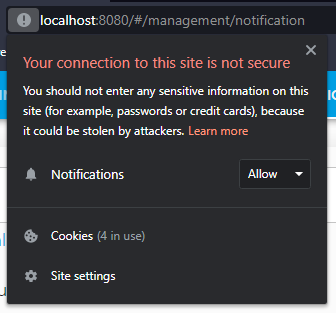
If you don't allow notifications immediately just keep in mind you can change it at any time.
I use Firefox, I get an error in the application indicating my browser does not support notifications, what can I do?
Firefox needs more investment than some other browsers.
Lead to Settings > Privacy & Security > History
Select Remember history.
Verify in Cookies and Site Data section that option Delete cookies and site data when Firefox is closed is un-checked.
You can also add an exception for https://next.dashboard.zaack.io
I use Brave, I can't get notifications working.
Go to Settings > Privacy and security and activate Use Google services to Push messaging.
I don't see any warning or error but can't get my notifications working
Have you reviewed the list of supported browsers ? You might be using one of the few browsers that cause us difficulties. We're working on that but in the mean time you might try with another browser.
If your browser in among the supported ones, and none of the previous tips work, please contact us.
References
WHO
[1] World Health Organization - https://www.who.int/news-room/fact-sheets/detail/ambient-(outdoor)-air-quality-and-health